
How to Deactivate Your Facebook Account, and Whatever Happened to Pirate?
Facebook has changed a lot over the years.
The menus have moved, the settings have moved, the privacy controls have moved, and occasionally I suspect Facebook itself isn’t entirely sure where it put everything.
But two things are still worth knowing:
- how to temporarily deactivate your Facebook account if you need a break
- and, more importantly, that Facebook once allowed you to speak Pirate
Yes, Pirate.
Because apparently at some point somebody at Facebook decided what the world really needed was fewer sensible menu labels and more references to captains, scallywags and pieces of eight.
Taking a break from Facebook
If you want to step away from Facebook without permanently deleting your account, you can deactivate your profile.
Deactivation is temporary. Your main profile is hidden from most things you’ve shared, but you can come back later by signing in again. Facebook also indicates that you can continue using Messenger while your profile is deactivated.
How to deactivate your Facebook profile
Facebook has moved this setting around several times over the years, so if you remember a completely different route, you’re not imagining things.
On the current desktop version of Facebook:
- Click your profile picture in the upper-right corner.
- Choose Settings & privacy.
- Choose Settings.
- Under Meta Account, click See more in Meta Account settings.
- Choose Manage account from the left side.
- Click Manage beside your Facebook profile.
- Choose Deactivation or deletion.
- Select Deactivate profile.
- Click Continue and follow the remaining instructions.
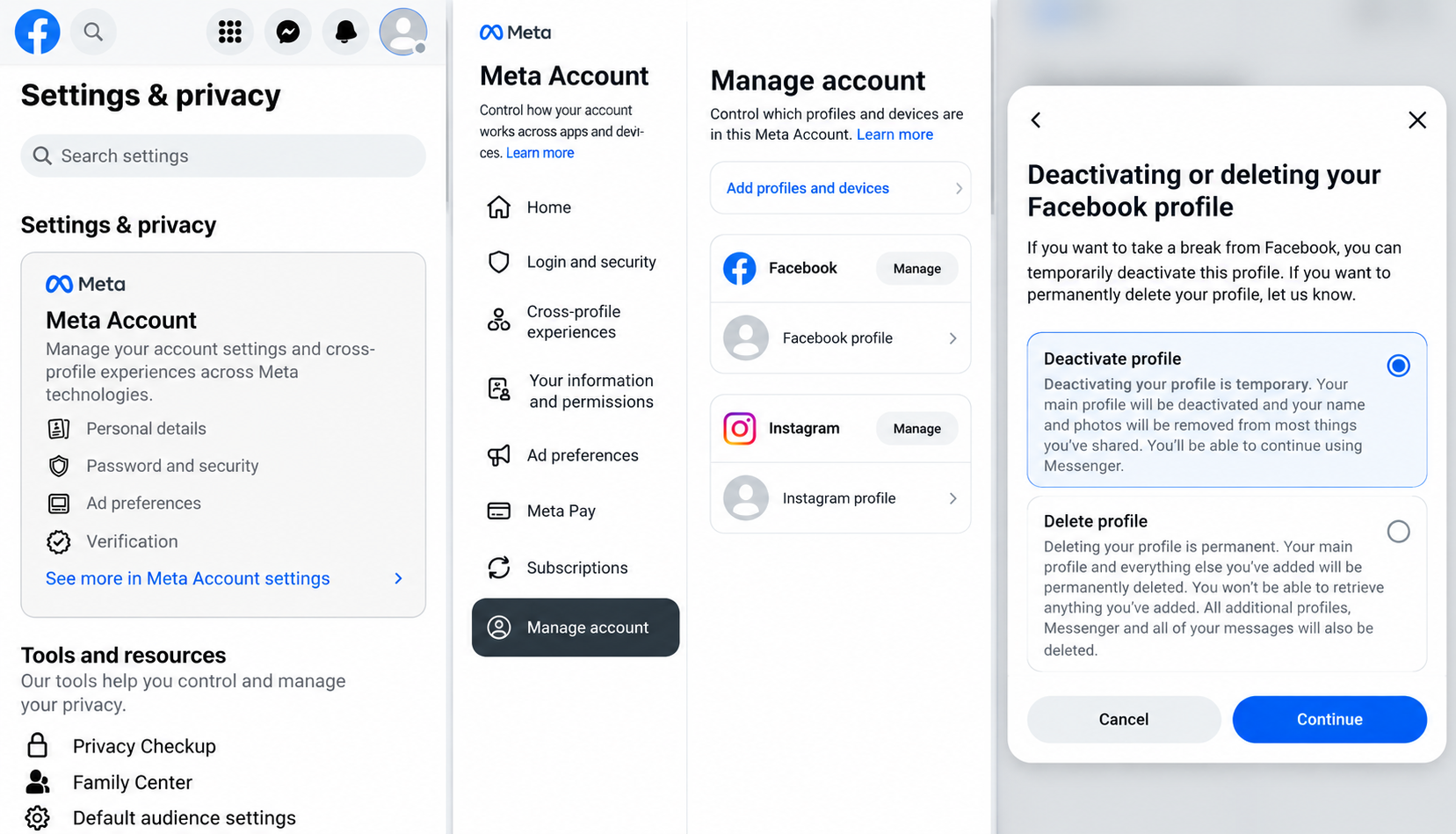
Deactivation is not the same as deletion
This is worth paying attention to because Facebook puts both choices on the same screen, and they are very different.
Deactivate profile is temporary. Your profile is hidden and you can return later.
Delete profile is permanent. Facebook warns that your profile and the information you’ve added will eventually be permanently deleted.
So if you’re simply tired of Facebook, deactivation is the considerably less dramatic option.
You can always delete the whole thing later after you’ve had a cup of coffee and confirmed that you really meant it.
Now, about the Pirate thing
For years, Facebook had one of my favourite completely unnecessary features: English (Pirate).
Instead of ordinary Facebook language, parts of the site were translated into pirate-speak.
Friends became mates. Various buttons and messages acquired a decidedly nautical flavour. Normal Facebook suddenly felt like it had been taken over by a crew that had recently misplaced its ship.
Was it useful?
Not even slightly.
Was it entertaining?
Absolutely.
Can you still change Facebook to Pirate?
Unfortunately, English (Pirate) is no longer normally available as a language choice in Facebook’s current settings.
You can still change Facebook’s language under Settings & privacy > Language or through the Language and region settings, but Pirate has largely become a bit of Facebook history.
There have been various unofficial tricks over the years for trying to bring the old Pirate language back, but those methods tend to stop working whenever Facebook changes something behind the scenes.
And Facebook changes things behind the scenes roughly every time you finally learn where something is.
Why keep this post at all?
Because not everything on a technology website needs to be about fixing a broken Mac.
Technology used to contain a lot more little surprises like this. Easter eggs, odd menu options and features somebody obviously created because they thought it would be funny.
Facebook Pirate was one of those.
It didn’t make Facebook safer, faster or more productive.
It just made it slightly more ridiculous.
And sometimes slightly more ridiculous is an improvement.
Need help with Facebook or your Mac?
If you’re trying to find a Facebook setting that has moved again, sort out an account problem, or get your Mac, iPhone or iPad working properly, Up Your Media can help.
We provide practical Apple and technology support in Parksville, Qualicum Beach and throughout Central Vancouver Island.
Contact Up Your Media if you need a hand.